
Most call tracking reporting has limited features for client SEO and lead gen because it only answers one question: how many calls happened.
The fix is simple: report calls and forms with attribution and page-level context in one live report that stays updated as new leads come in.
Without that, SEO and lead gen performance are hard to prove, because the “results” live across disconnected places.
Phonecalls sit in a call tracking log, forms sit in WordPress, and traffic sits in analytics, with no single view that ties the work to the outcome.
That’s when reporting becomes a monthly scramble of screenshots and PDFs, and optimization slows down because the data isn’t connected.
In this post, I’ll break down what a client-ready call tracking report actually is, what it needs to include, and why dynamic reporting is the easiest way to keep both you and the client aligned.
The Real Problem With Most Call Reporting
The core issue isn’t a lack of data; it’s that the data is scattered and frozen, so it can’t answer the questions that matter.
The Common Patchwork Stack
Most reporting stacks split the story across three places.
- Calls live in a call tracking log that shows volumes and timestamps, but not the full context behind each lead.
- Forms live inside WordPress or a form tool, separate from call data, so lead totals are always incomplete.
- Traffic and source data live in analytics, but they don’t reliably connect to individual calls or submissions at the lead level.
The result is a reporting gap where you can’t clearly tie outcomes back to the work you’ve done that has increased the lead volume.
Instead of reading one clean report, you end up reconciling tools, comparing date ranges, and explaining why numbers don’t match.
It’s a difficult sell and often leads clients to think that they’d get the same call volume without your support.
The “Static PDF Report” Problem
Even when the data is stitched together, it usually gets delivered as a static PDF.
That creates a second problem: the report is outdated the moment it’s sent.
Calls and forms continue coming in daily, but the client sees a snapshot that can’t answer “what changed this week” without another rebuild.
It also forces you into a repeat work mode, because every follow-up question becomes a new round of screenshots and exports.
These kinds of reporting issues can seriously slow down your ability to scale your lead gen or client SEO business.
What “Client-Ready” Call Reporting Means
A call tracking report isn’t just a list of calls, and yet, so many systems provide you with only that level of data.
What it should be is a single view that explains performance by connecting calls and form submissions to what caused them.
That means lead totals, lead sources, and the pages that generated the inquiries, shown in a way that can be compared over time.
It should separate meaningful leads from noise, highlight trends, and make it obvious what improved and why.
Most importantly, it should support decisions.
A good report doesn’t just say “calls increased.”
It shows which sources and pages drove the increase, and where the next optimizations should focus.
What Clients Actually Want To See In A Call Tracking Report
The more data points you add to a report while struggling to connect them into usable information, the more you’ll confuse clients.
Clients don’t want more data; they want clarity on how many real leads came in, where they came from, and what’s driving the trend.
Lead Volume That Matches Business Reality
Raw call counts are misleading because they include missed calls, wrong numbers, repeat dials, and quick hang-ups.
A client-ready report should focus on meaningful leads by separating noise from real opportunities.
That includes totals for calls and forms, unique callers, and first-time callers, so the numbers reflect actual demand, not busywork.
It should also highlight missed calls as revenue leakage, because that’s an easy operational win that improves results without changing marketing.
When lead volume matches business reality, the report becomes trustworthy, and the conversation shifts from “are we getting value” to “how do we grow it.”
Lead Source Breakdown
Source breakdown is where reporting becomes decision-making.
Instead of lumping everything into a single total, the report should show which channels produced inquiries, such as organic search, paid ads, social, referrals, and other sources.
This matters because different sources behave differently, and they don’t convert at the same rate.
A clean source view also prevents false conclusions, like judging performance by clicks or traffic volume instead of leads created.
When source reporting is accurate, you can confidently scale what’s producing calls and forms, cut waste, and explain performance changes without guesswork or long justifications.
Lead Page Attribution
Clients want to know what parts of the website are actually producing inquiries.
Page attribution shows which pages generate calls and form submissions, and which pages influence conversions even if they aren’t the final click.
That distinction matters because the page that ranks is not always the page that converts.
A good report highlights the top lead-driving pages, trends over time, and “quiet winners” like service pages or location pages that consistently produce leads.
This makes SEO progress tangible because you can point to specific assets that are generating inquiries, then replicate what works across new pages.
Call Details That Matter
Beyond volume, the report needs call details that explain lead quality and operational impact.
Useful signals include call duration patterns, repeat callers, time-of-day trends, and missed call counts.
The key is presenting these as decision support, not vanity metrics.
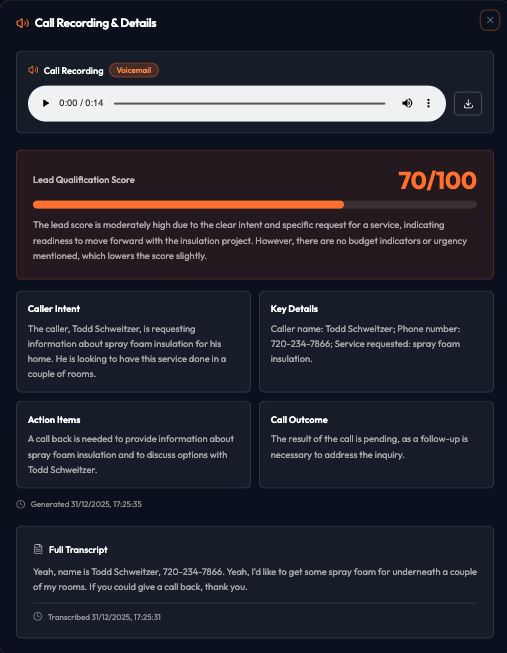
This is also where an AI call quality score becomes powerful, because it helps separate sales conversations from wrong numbers and low-intent calls at scale.
An example I like to use is a pool cleaning company receiving a call from someone looking for a bottle of pool chlorine. It registers as a call, but it’s not a valuable one for a service company.
With RingRobin, calls can be scored automatically, so clients see not just “more calls,” but “more good calls,” and you can optimize toward the leads that actually turn into revenue.
More on RingRobin shortly.
Form Leads Need Attribution Too
Forms are often the “quiet” leads that get missed in reporting, even though they can represent high-intent inquiries.
They also behave differently from calls, because visitors may compare options, leave, and return later before submitting.
That makes attribution and page context even more important, otherwise the wrong pages and sources get credit.
A client-ready report should show form submissions by source, the pages that produced them, and completion versus abandonment signals that reveal friction.
It should also capture form field data, because what prospects type tells you what they care about most.
When calls and forms live in one report, performance becomes complete, and decisions get easier.
Dynamic Reporting As A Win-Win Solution
Dynamic reporting solves the two biggest problems in client reporting at once: workload and clarity.
Instead of rebuilding PDFs every month, the report updates automatically as new calls and form submissions come in.
That means less manual exporting, fewer screenshots, and far less time spent reconciling numbers across tools.
For clients, it removes the “wait until the next report” gap.
They can open one link and see current performance, lead sources, and top pages whenever they want.
It also reduces back-and-forth, because most questions can be answered directly inside the live report.
When the report stays current, conversations get shorter, decisions get faster, and optimization becomes continuous instead of monthly.
How RingRobin Makes Client Call Tracking Reports Easy
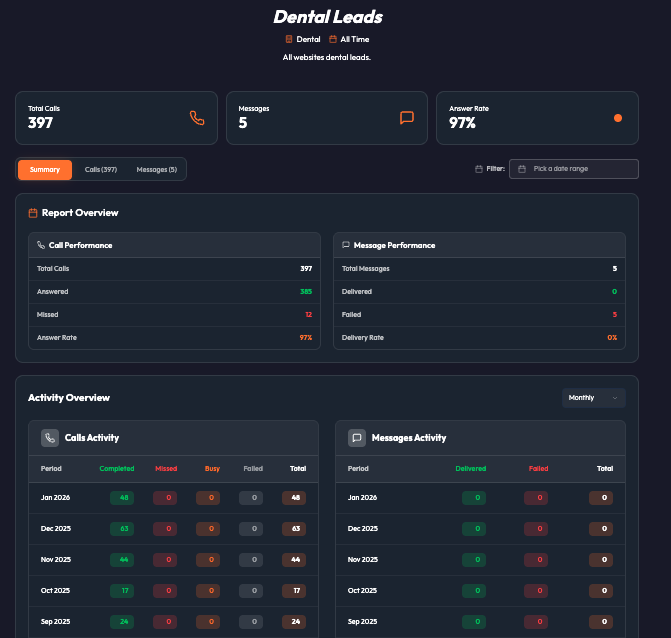
RingRobin turns call tracking into a single, live reporting view that stays current and answers the questions clients care about without repetitive manual work.
One Link, Always Current
RingRobin replaces static monthly reporting with one link that updates automatically as new calls and form submissions come in.
Instead of exporting spreadsheets, stitching screenshots, and rebuilding PDFs, you share a live report that stays accurate all month.
That means clients can check performance whenever they want, and you don’t get dragged into “can you pull an update for this week” requests.
It also keeps conversations grounded in the same data, because everyone is looking at the same source of truth.
The result is less reporting overhead for you and more clarity for clients, without adding complexity to your process.
You can also add your own branding to RingRobin’s whitelabel reports to give you an even more professional look.
Call Quality Scores
RingRobin replaces static monthly reporting with one link that updates automatically as new calls and form submissions come in.
Instead of exporting spreadsheets, stitching screenshots, and rebuilding PDFs, you share a live report that stays accurate all month.
That means clients can check performance whenever they want, and you don’t get dragged into “can you pull an update for this week” requests.
It also keeps conversations grounded in the same data, because everyone is looking at the same source of truth.
The result is less reporting overhead for you and more clarity for clients, without adding complexity to your process.
You can also add your own branding to RingRobin’s whitelabel reports to give you an even more professional look.
Client-Friendly Without Being Dumbed Down
Client reporting fails when it swings to extremes: either it’s overly technical, or it’s so simplified that it loses credibility.
RingRobin avoids both by presenting a clear top-level view that answers the obvious questions first, then allows deeper detail when it’s needed.
Clients can see lead volume trends, top sources, and top pages without wading through raw logs.
When they do want proof, the supporting call details are right there in the same report, not hidden across other tools.
That keeps the report easy to understand, but still precise enough to support real decisions.
Start Using RingRobin For All Call Tracking Websites
Call tracking only becomes client-ready when it does more than count calls.
A real report connects calls and form submissions to sources, pages, and meaningful trends, so results are easy to prove and easy to act on.
Dynamic reporting removes the monthly PDF scramble because the report stays current as new leads come in.
If you manage client SEO, lead gen, or rank-and-rent sites, this is the simplest way to keep reporting clear and decisions fast.
Sign up for a free RingRobin account and start generating live call tracking reports today.