
Call tracking is supposed to answer a simple question: what’s generating calls?
But the moment you run more than one traffic source, that answer gets blurry fast.
SEO, Google Ads, Facebook, referrals, and direct traffic start bleeding together, and “a call happened” becomes the only thing you can say with certainty.
That’s when budgets get misallocated, winning campaigns get underfunded, and CRO changes turn into guesswork.
The frustrating part is that it’s not a strategy problem.
It’s a measurement problem.
And there’s a simple setup that makes call attribution reliable again, even across multiple channels and campaigns.
In this post, we’ll break down what’s really happening behind messy call tracking data, what it’s costing you, and how to fix it in a way that’s fast, scalable, and built for lead gen.
The Real Attribution Problem With Phone Calls
Phone calls are harder to attribute because the conversion doesn’t always happen on the website.
When someone taps a click-to-call button, the site can usually record the session and the source before the dialer opens, so attribution is often possible.
But a huge share of calls still come from visitors who read a page, copy the number, or dial from the header without clicking anything trackable.
In those cases, the lead is created outside the browser context, and the source and journey data that explains why the call happened never gets attached to the call itself.
That’s why basic call tracking often tops out at “a call happened,” especially once you’re running more than one channel.
SEO, Google Ads, Facebook, and referrals all end up feeding the same visible phone number, and the calls blend into a single bucket.
Analytics can still report traffic sources, but it can’t reliably connect a specific session to a specific phone call after the fact.
If you’ve ever tried linking the traffic analytics timing data to the time a call was placed, then you know how painful and inaccurate it becomes.
The result is a reporting gap that slows down optimization.
Budget decisions drift toward clicks and traffic instead of call-producing sources and pages, and CRO turns into trial and error instead of a repeatable process.
What Is Dynamic Number Insertion?
Dynamic number insertion is a call tracking method that changes the phone number shown on your website based on how a visitor arrived.
A visitor coming from Google Ads can see one tracking number, while someone coming from organic search or Facebook sees a different one.
To the visitor, nothing feels different because they still see a normal phone number in the header, on buttons, and on the contact page.
Behind the scenes, that number acts like an identifier that carries the source context into the call.
When the call comes in, the tracking system knows which source and campaign produced it, even if the visitor never clicked a trackable button.
Why Does Dynamic Number Insertion Matter?
Phone calls don’t always carry their source data with them, and that’s where attribution breaks.
On mobile, a click-to-call button can preserve full source attribution because the website records the session before the dialer opens.
But many calls don’t happen that way.
Some people browse on one device and dial from another.
Others copy the number, call later, or dial straight from the header without tapping a tracked button.
In those cases, the source link gets lost, and calls collapse into a vague “direct” bucket.
Dynamic number insertion prevents that by showing a source-specific tracking number, so the call still arrives with its origin attached.
More importantly, your call tracking reports show you the exact source for all calls, allowing you to make better decisions on where to focus your attention and money.
How DNI Works Under The Hood
Behind the scenes, the goal is simple: make the phone number itself carry the source context into the call.
When a visitor lands on your site, their traffic source is detected using referrer information and campaign tags from ads or social posts.
A rule set then selects the correct tracking number for that source or campaign.
That number is displayed in the header, on click-to-call buttons, and anywhere else the phone number appears.
The number stays consistent for the entire visit, so the experience feels normal and trustworthy.
If the visitor calls immediately, calls later, or dials manually, the call still reaches the same business.
The difference is that the tracking system can now match the dialed number back to the source that triggered it, so attribution stays intact.
Now, let me introduce you to a free call tracking system that does all this with just a few clicks.
How RingRobin Solves DNI

RingRobin makes dynamic number insertion simple to deploy, easy to manage, and reliable across every traffic source you care about.
DNI + Chirps = Full Attribution
RingRobin doesn’t just swap numbers and label calls.
It connects the call to the full context behind it, so attribution becomes useful for CRO and reporting, not just a “source” field in a log.
With DNI enabled, visitors from different channels see different tracking numbers, which means the call itself carries the source information even when no click-to-call event exists.
Chirps then fills in the rest of the story by tying that call to the visitor session and on-site behavior.
That’s how you can see where the visitor came from, what pages they viewed, how they moved through the site, and which page ultimately triggered the call.
It also covers the situations where attribution usually breaks, like manual dialing, calling later, or browsing on one device and calling from another.
Instead of guessing, you can prove which channels and campaigns generate calls, then optimize pages and CTAs based on real outcomes.
Why One Tool Beats A Patchwork Stack
Most setups force you to stitch together call tracking, analytics, and form tools, then hope the data lines up.
Call tracking tells you a call happened, but it often can’t explain the journey behind it.
Analytics shows traffic sources, but can’t reliably attach a specific phone call back to a specific session once the dial happens off-site.
Form plugins show submissions, but don’t unify calls and forms into one attribution model.
The result is slow decision-making, messy reporting, and CRO changes based on assumptions.
RingRobin replaces the patchwork with a single source of truth.
Calls, sources, sessions, click-to-call behavior, and on-site journeys live in one place, so the answer to “what generated this lead” is immediate and consistent.
That makes scaling safer, optimization faster, and reporting far easier to trust.
Quick Start: Set Up DNI In Minutes
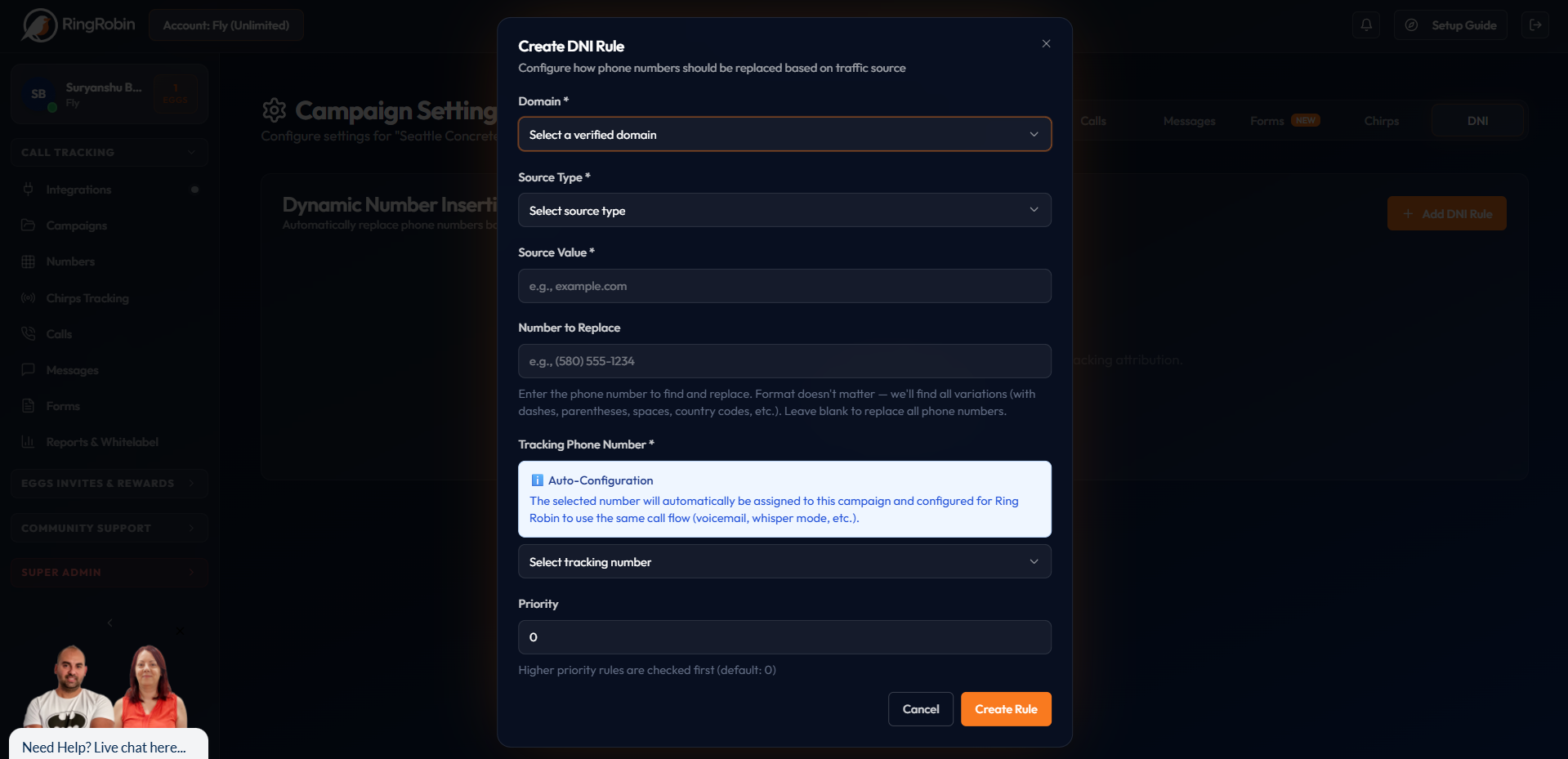
Getting started with RingRobin’s dynamic number insertion is fast and easy. All you need to do is register for a free account, and then the setup is mostly just assigning numbers to sources.
Create a tracking number for each channel you want to measure, like Google Ads, Facebook ads, organic search, or a specific referral partner.
In your campaign settings, map each traffic source to its assigned number.
Once that’s done, visitors arriving from those sources will see the matching number on your site, including in the header and any click-to-call elements.
From there, call attribution starts populating automatically.
You’ll be able to monitor which sources generate calls, compare performance across channels, and make budget and CRO decisions based on real lead data.
Sign Up For A Free RingRobin Account
Calls are only valuable when you can prove what caused them.
Dynamic number insertion keeps attribution accurate across SEO, ads, social, and referrals, even when visitors dial manually or call from another device.
That means clearer reporting, smarter budget decisions, and faster CRO wins, because the data shows exactly which sources and pages generate calls.
RingRobin makes this easy by combining dynamic number insertion with Chirps, so calls arrive with full context instead of guesswork.
Sign Up For A Free RingRobin Account and start attributing calls from your next visitor in just a few minutes.