
Conversion rate optimization for lead gen is simple: increase qualified phone calls and form submissions from the traffic you already have.
The hard part is knowing what to change, because most sites can’t see what actually caused a lead.
If you don’t know where the visitor came from, what pages they viewed, or whether they tapped a click-to-call button, you end up moving CTAs and rewriting forms based on guesswork.
But there’s a different and more educated approach.
What you’ll learn on this page is my CRO process, specifically designed for calls and forms, the exact data you need to do it properly, and how to get that data without stitching together call tracking, form plugins, and analytics.
Why CRO Matters Even When Traffic Is “Low”
Let me first address a huge misconception about CRO with this statement: CRO matters most when traffic is low, because that’s when you can make small adjustments to your site without any pressure.
I’m completely in favor of implementing day-1 call tracking and attribution, because even a small trickle of visitors creates patterns you can analyze.
Not only do you get to know which CTAs get clicked and where forms actually get completed, but also which traffic sources convert the best.
Those early signals tell you what to replicate across other pages, so you’re not building the rest of the site on assumptions.
See, ranking spikes don’t fix conversion problems; they magnify them.
If your conversion rate is weak, more traffic just scales wasted visitors and missed calls, and that can even negatively impact your rankings.
If your conversion rate is tuned, the same traffic increase produces more leads, faster, with no extra effort.
For lead gen and rank-and-rent, that means CRO shortens time-to-profit and raises the value of every page you publish.
The Data You Actually Need For CRO (And Why Most Sites Don’t Have It)
I used to keep track of conversion-related data in multiple tools (more on that shortly), and I found out the hard way that the most valuable information for CRO comes down to three areas.
1) Attribution Data
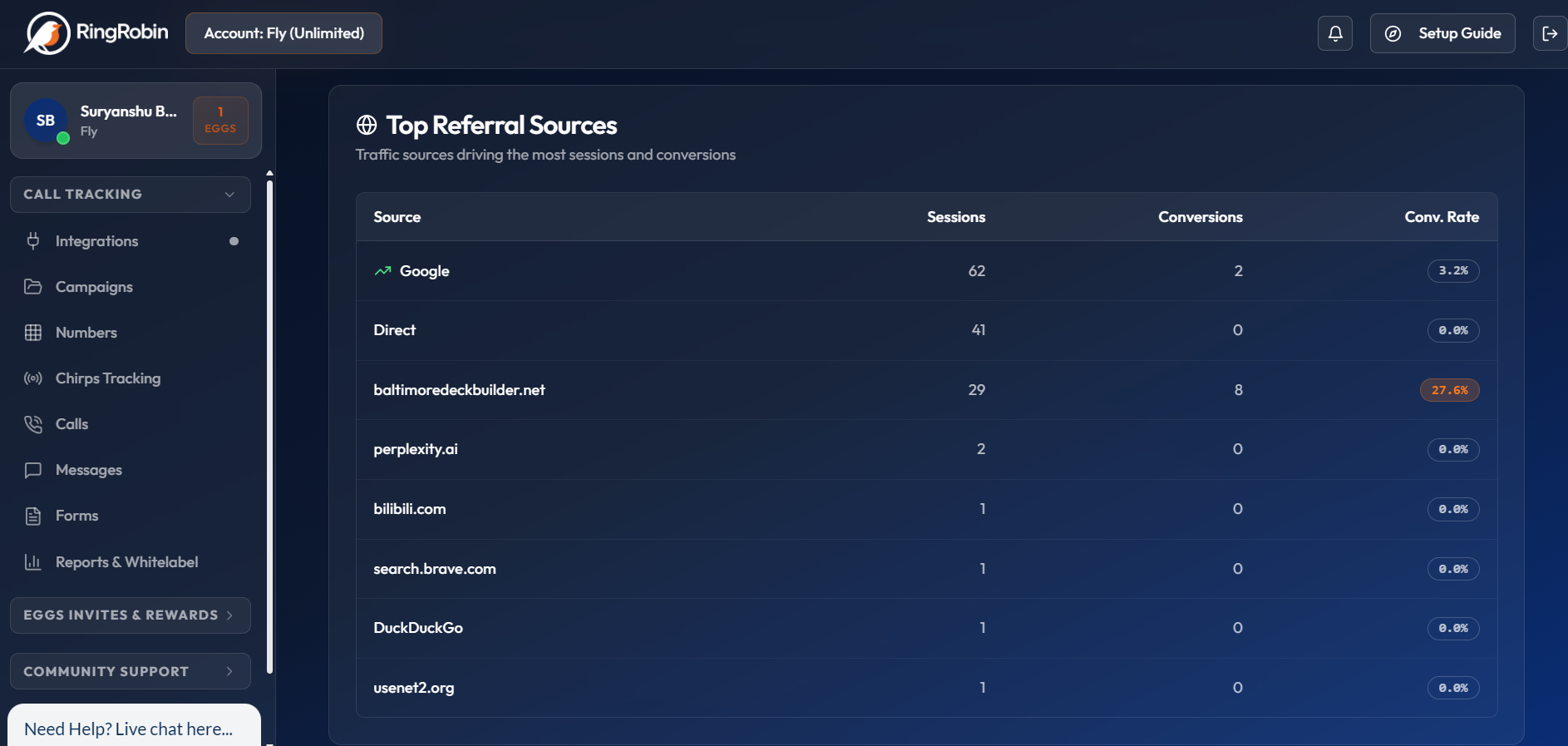
Attribution data is the missing piece that makes CRO feel impossible on most lead gen sites.
Call attribution data is simply the “receipt” for every lead, showing exactly where the visitor came from and what happened before they called or submitted a form.
I’ve watched people spend weeks “testing” new CTAs and form placements, only to realize later that the leads they did get were coming from one specific source and landing page the whole time.
If you don’t know the source and campaign that produced a call or form, every change is a guess.
You also want the tracking tags your ads and posts carry, so every call or form can be tied back to the exact campaign, platform, and even the specific ad that generated it.
Once you can track this data on your site, you’ll be in a seriously better position to make positive CRO changes.
2) Session And Behavior Data
Session and behavior data are what tell you why a lead happened, not just that it happened.
It shows how many pages a visitor viewed, whether they were in a new session, how long they stayed, and what route they took through the site.
This matters because leads don’t always come from the first page they land on.
Most visitors land on one page, browse a service page, check a second page for reassurance, and then convert somewhere else.
When you can see the full navigation path, you stop optimizing the wrong page.
On the flipside, when you see a number of visitors eventually leaving the site from the same page without a click to call action or form submission, then it hints at issues with that page.
You also want to know the conversion trigger.
Did they call from the contact page, a service page, or a header button?
And on mobile, did they tap a click-to-call button, or call after reading the page?
3) Lead Event Data
Lead event data is the conversion layer, and it’s where CRO decisions become obvious.
It includes the raw totals for calls and form submissions, but it also includes completion rates, so you can see if your forms are creating friction.
When you capture form field data, you learn what prospects actually care about, which helps you tighten your page copy, your offers, and even your service prioritization.
You can also monitor multiple forms on the same page and identify whether more people fill the top, middle, or bottom form.
And gathering data on different numbers of form fields is equally important to see where the sweet spot is for converting as many people as possible.
All of this is great advice I gained over the years, but I had to approach the process with a patchwork of tools.
Let me explain.
The Common CRO Mistakes When You Only Use a Patchwork Stack
The biggest CRO mistakes I see usually come from the same root problem: a patchwork tracking stack.
You’re looking at call tracking in one place, form submissions inside WordPress, and traffic numbers inside analytics, and none of it connects cleanly.
I call this the 3-Tool-Headache, and it’s a major source of frustration.
Call tracking tells you a call happened, but not what the visitor did before they called.
WP forms tell you a form was submitted, but not the real source and path that led to it.
Analytics tells you where traffic came from, but it can’t tie that session to a specific call or form lead.
You can try to tie the data from all sources into one spreadsheet, but it ends up being quite inaccurate, and it takes up a huge amount of time.
The result? You end up optimizing based on assumptions.
You guess which landing pages are producing the best leads.
You guess which campaigns drive calls versus forms.
And you guess which CTA placement wins on mobile, because you can’t see whether people tapped click-to-call or converted somewhere else.
Those pain points really started adding up, and it became increasingly problematic as my portfolio of lead gen sites grew bigger.
And that’s when I had the idea of creating a completely new enterprise call tracking system that made my life easier.
Using RingRobin’s Chirps For CRO (The One-Tool Workflow)
Let me introduce you to the ideal workflow for call and form tracking on lead gen, rank & rent, and client sEO websites.
What Is RingRobin?
RingRobin is an enterprise call tracking and lead intelligence platform built specifically for lead gen and client reporting.
Instead of treating calls and forms like separate events, RingRobin connects them to the full visitor journey, so you can see what happened before the lead, what caused it, and what to improve next.
Best of all, RingRobin is free to use, and you can register your account right here.
It only takes minutes to activate and get your first campaign set up, and you’ll be ready to start tracking the most important data for CRO.
Speaking of data, there’s another important part of RingRobin.
What Are Chirps?
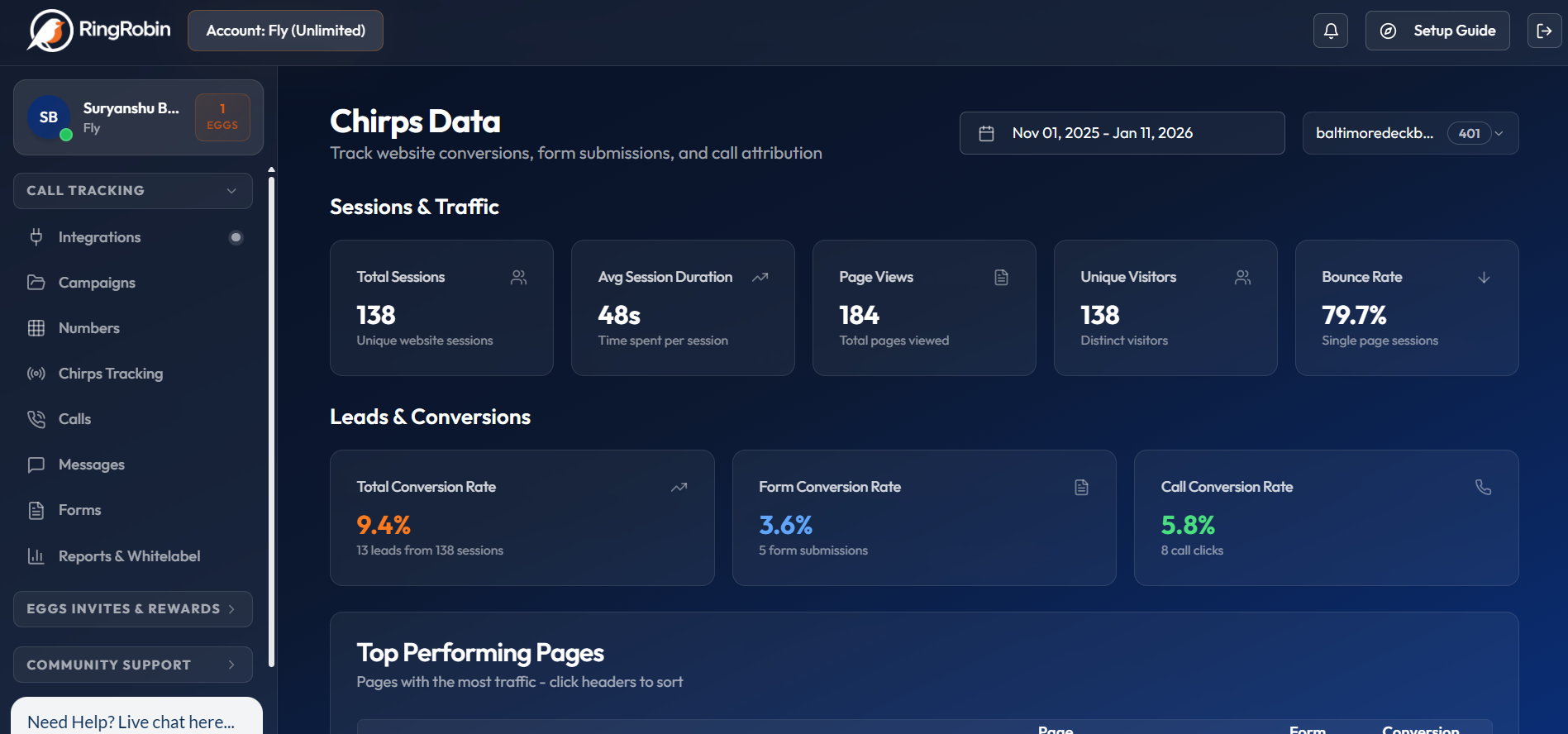
Chirps is the tracking layer inside RingRobin that captures visitor behavior, attribution, and lead actions in one place.
It gives you CRO-ready data without relying on a patchwork of call tracking, form plugins, and analytics tools.
And that provides critical benefits:
- Traffic & Session Tracking: Page views, unique sessions, time on site, and navigation paths.
- Form Tracking: Form submissions, field data capture, completion rates, and abandonment metrics.
- Marketing Attribution: Clear source tracking, plus campaign tagging from ads and posts, so leads tie back to what generated them.
- Dynamic Number Insertion: Phone numbers change based on traffic source or campaign, configured inside Campaign Settings.
- Real-Time Data Transmission: Visitor data is sent to RingRobin with lightweight payloads and offline handling.
- Privacy & Performance: Respects Do Not Track, uses a small script footprint, loads asynchronously, and persists data locally.
The “Single Source Of Truth” Benefit
When calls, forms, attribution, and on-site behavior all live in one system, CRO becomes a clean workflow instead of a guessing game.
You can look at a lead and immediately see where the visitor came from, what they viewed, what triggered the conversion, and what should be tested next.
That means faster decisions, clearer wins, and a repeatable process for scaling conversions across every new page you publish.
Get Your Free Ring Robin Account
CRO for lead gen isn’t about chasing “best practices” or making random design tweaks.
It’s about turning more of your existing traffic into calls and form submissions, and knowing exactly what caused those leads.
When you can see source, behavior, and conversion triggers in one place, you stop guessing and start making changes that reliably lift results.
That’s the advantage of running CRO with RingRobin and Chirps, because you get the full picture without stitching together multiple tools.
Get your free RingRobin account and start tracking, attributing, and improving conversions from your very next visitor.