
Finding the right keywords sounds straightforward until you’re three hours into a spreadsheet, second-guessing every number, and still not confident you’ve picked the right one.
Most guides will tell you to find high-volume, low-competition keywords. What they don’t tell you is why that advice fails most of the time, and what to look at instead.
After 15 years of building and ranking websites across dozens of niches, I’ve narrowed keyword research down to a 4-step process that eliminates the guesswork. It’s not about chasing the biggest numbers. It’s about knowing exactly which signals to read, in which order, and what to do when they conflict.
In this guide, I’ll walk you through each step, what to look for, how to evaluate it, and the mistakes that send most SEOs back to square one. By the end, you’ll have a repeatable process you can apply to any site, in any niche, right away.
How To Find The Right Keywords For SEO
Through over 15 years of experimenting and testing different methods of using keyword research tools, I have developed a 4-step process that I use for all my website and content planning.
1. Start With What You Know
There are three things I do to get started with generating keyword ideas before I even attempt to choose keywords for SEO.
Here’s what I do and how AI has helped me speed up the process.
Check Competitor Keywords
One of the fastest ways to build a keyword list is to look at what your competitors are already ranking for. If a page is consistently appearing on page one, it means Google has validated that the content matches what searchers want. That’s valuable intelligence you can use before you’ve written a single word.
The first thing to get right is identifying who your actual SEO competitors are, because they’re not always the same as your business competitors.
A local competitor may have no online presence worth studying, while a large authority site in your niche could be dominating the exact keywords you want to target.
Search your core topic in Google and take note of which domains appear repeatedly across the first page. Those are your real SEO competitors.
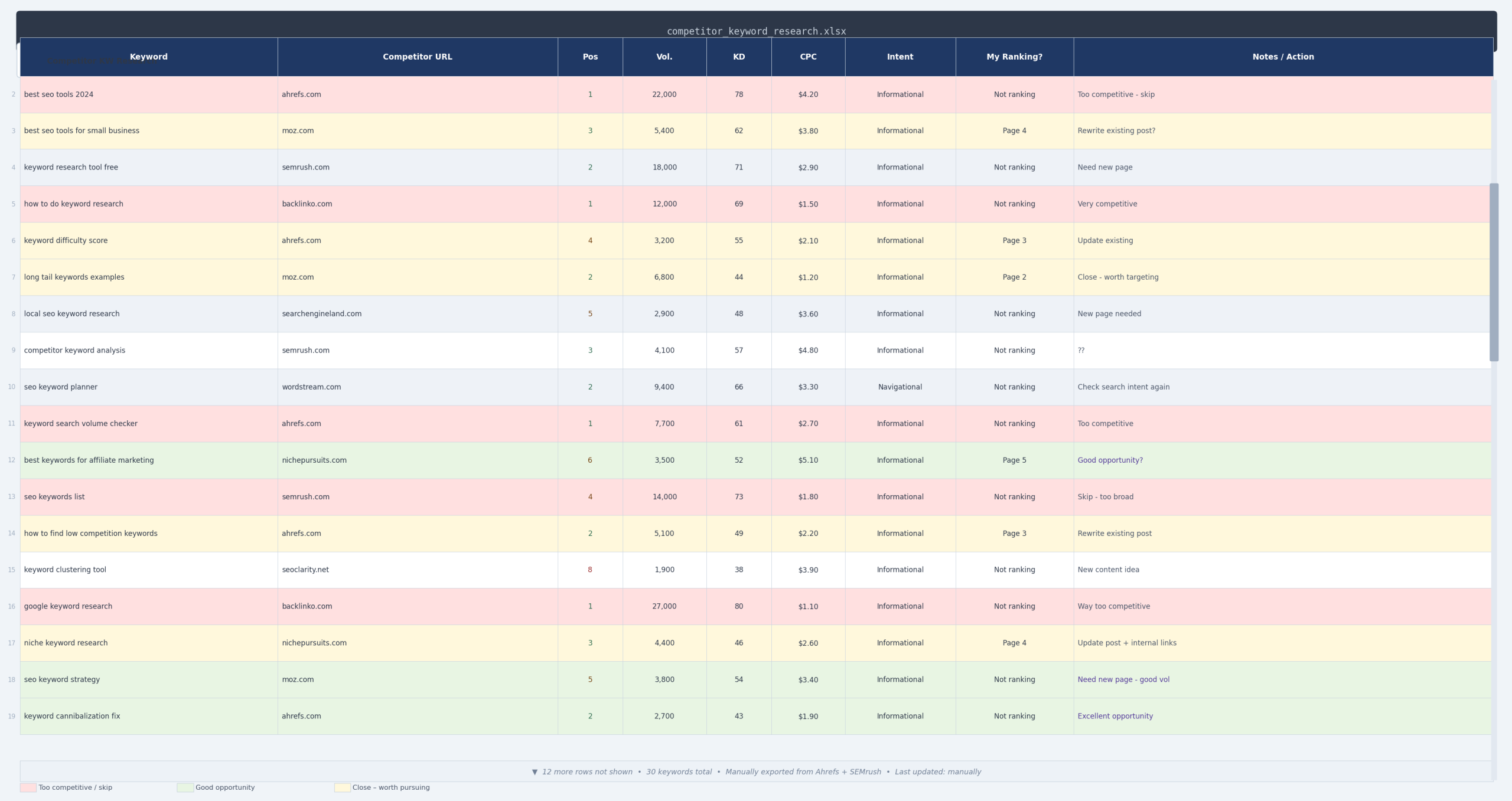
Once you have a list of 3 to 5 competitor URLs, tools like Ahrefs Site Explorer and SEMrush Organic Research allow you to enter any domain and see every keyword it currently ranks for, along with the ranking position, estimated monthly traffic, and keyword difficulty score.
This gives you a map of exactly what is working in your niche right now.
When you’re reviewing the data, resist the temptation to chase the highest-traffic keywords immediately. Instead, look for three things:
Keywords ranking in positions 4 to 15. These are pages that are close to the top but haven’t quite broken through. They signal genuine ranking potential for the topic without the extreme competition of a solidly held position 1 result.
Keywords the competitor ranks for on multiple pages. When you see the same keyword appearing across several of their URLs, it often indicates a keyword cannibalization problem on their site. That’s a gap you can step into with a single, well-optimized page.
Topics they haven’t covered in depth. Look at their top-ranking pages and read them. If the content is thin, outdated, or doesn’t fully answer the search query, that’s an opening. Google’s own helpful content guidance explicitly rewards pages that provide a more satisfying answer than what currently exists.
A practical tip: export the keyword data to a spreadsheet and filter by position range (4 to 20) and a minimum monthly search volume you’re comfortable targeting. This cuts the list down from thousands of keywords to a manageable shortlist you can actually evaluate properly in the next steps.
Check Keywords You Already Rank For
If your site has been live for any length of time, you already have keyword data worth mining before you look anywhere else.
The keywords your existing pages rank for tell you what Google thinks your content is about, and that is not always the same as what you intended when you wrote it.
Google Search Console is the starting point here and it is free. Open the Performance report, set the date range to the last three months, and switch the view to show queries.
What you are looking at is every search term that resulted in an impression or click to your site, along with the average position for each one.
The most valuable data is not in your top performers. Look specifically for keywords sitting between positions 4 and 20.
These are pages Google has already associated with a topic but hasn’t committed to pushing higher. They represent your lowest-effort opportunities because the hard work of getting Google’s attention has already been done.
Click into individual pages and check which queries are driving impressions to each one. You will often find a page ranking for keywords that span two or three distinct topics.
Take note of these. They are either opportunities for new dedicated content or candidates for consolidation, both of which you will work through in the steps ahead.
Use Seed Keywords
A seed keyword is a short, broad term that sits at the centre of your niche. It is not something you will necessarily target directly, but it is the starting point from which your entire keyword list grows.
Think of it as the trunk of a tree. Every branch, every variation, every long-tail opportunity stems from that single root term.
Before you open any tool, spend five minutes writing down the core topics your site covers. A site about kids’ outdoor toys might start with terms like “kids scooter”, “balance bike”, or “outdoor toys for toddlers”. Each one of those is a seed.
Once you have your seeds, enter them one at a time into a tool like Ahrefs Keywords Explorer or SEMrush Keyword Magic Tool. What comes back is not a shortlist, it is a raw database of every related term people are actually searching for.
Here is what that looks like using “kids scooter” as an example.
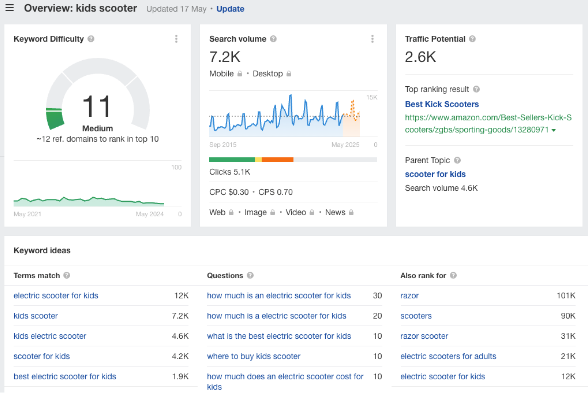
As you can see, a single seed term generates hundreds of variations. Some will be irrelevant, some will be too competitive, and some will be exactly what you are looking for.
The job at this stage is not to evaluate them. It is simply to collect as many relevant variations as possible before you start filtering.
A few seed keywords entered across different tools will typically return thousands of rows of data. That scale is exactly why the evaluation steps that follow matter so much.
2. Evaluate The Keywords
Beginner SEOs often get hung up on finding the keyword with the highest search volume, but that approach is overly simplistic and often leads to very poor results.
It’s an important metric to look at, but there is more to it.
Let me explain.
Identify Monthly Search Volume
Monthly search volume is a critical indicator for SEO, but it should also act as a warning sign.
The higher the search volume, the more likely other SEOs are competing for that top spot, which makes high-volume keywords generally much harder to rank for.
What I recommend is that you never look at search volume on its own. You need to assess it against competitiveness, which is covered in the next step.
Most keyword tools will provide monthly search volume automatically. You can also get this data from Google Keyword Planner, though you will need an active Google Ads account to see precise figures rather than broad ranges.
Once you have your volume data, sort your keyword list from lowest to highest rather than highest to lowest. This shifts your focus toward achievable targets instead of aspirational ones that could take years to crack.
Analyze Keyword Difficulty
Every major SEO tool has its own keyword difficulty score, and they all claim to have cracked the formula.
Ahrefs, Moz, and SEMrush each use different algorithms, different data sources, and different weightings, which is why the same keyword can show a difficulty of 30 in one tool and 65 in another.
That inconsistency is not a minor quirk. It can send you chasing keywords that are far harder than they appear, or cause you to overlook genuinely winnable opportunities.
The scores also tend to be heavily weighted toward backlink data, which means a keyword can show as “difficult” simply because the top-ranking pages have a lot of links, even if the content itself is thin or outdated.
Moz’s own documentation acknowledges that difficulty scores are estimates, not guarantees. Treat them as a rough directional signal rather than a hard rule.
A more reliable approach is to look directly at the search results for any keyword you are seriously considering. Count how many of the top ten results come from large authority domains versus smaller, more comparable sites to yours.
If smaller sites are already ranking on page one, that is a stronger signal of genuine opportunity than any difficulty score a tool can give you.
Check Cost-Per-Click
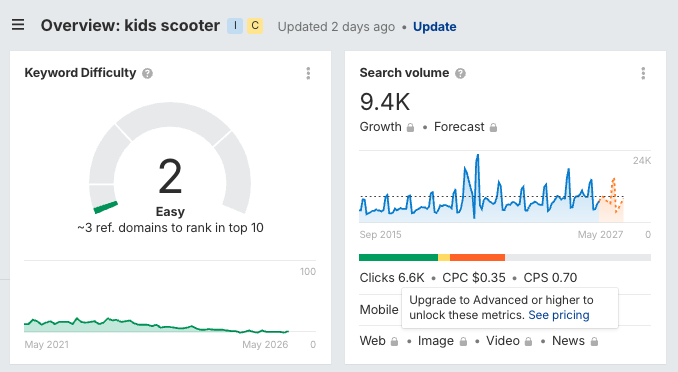
Cost-per-click is one of the most reliable indicators of true keyword competition, and it is often overlooked in favour of keyword difficulty scores.
When advertisers are paying a high CPC for a keyword, it means businesses have tested that term and found it converts. That level of commercial intent almost always means stronger organic competition too.
The reverse is also useful. A keyword with decent search volume but a low CPC often signals lower competition and a more informational audience, which can be easier to rank for.
Keep in mind that high CPC keywords also tend to trigger more paid ads above the organic results. Even if you rank in position one organically, a page dominated by ads above the fold will deliver a lower click-through rate than you might expect.
You can pull CPC data from Google Keyword Planner, Ahrefs Keywords Explorer, or SEMrush Keyword Magic Tool. All three show CPC estimates alongside search volume, but I’ll have another easier option for you shortly.
Before you rush to choose keywords from your research, there’s another important step in my research process you have to follow.
3. Analyze Search Results
The last thing you need to complete your keyword research is a careful look at the actual search results page. This is particularly important if you have a couple of keywords that might have very similar metrics.
Pay Attention To SERP Layout
One thing I always do for the higher search volume keywords that I might want to target is to have a look at what the first page in search engine results looks like above the fold.
Take a close look at how many organic results you see. In some cases, you’ll see results where everything above the fold is either a paid ad or a map (GMB) listing.
This information can be critical when you want to narrow things down between a few related keywords.
You may want to prioritize keywords that also have rich results on page 1, as those can give you an opportunity to gain more visibility and visitors without increasing your rankings.
Let me explain.

Look For Rich Snippets In Search Engines
Rich snippets are features that Google and other search engines have implemented in search results to make it clearer to people that the pages match their search intent.
These include star ratings, additional links, knowledge pack entries, and many more (check out this blog for more details).
Finding rich results is a great addition to your SEO strategy and can become a critical deciding factor in your keyword research.
Identify Search Intent
The last thing you need to do is make sure that what the search results are presenting for a keyword matches what your content plan is.
See, some keyword terms may overlap between niches.
Here’s an example.
Someone searching for the term “Black Mirror” could be looking for interior design advice or for information on the popular TV show.
Making sure that you focus on relevant keyword ideas based on their search intent will help you avoid situations where your content simply won’t rank.
4. Choose Your Primary Keyword
OK, now we’re ready for you to choose your target keyword, and the good news is that Xagio will make all of this a hell of a lot easier.
Here’s what you should do first.
Run A Xagio Audit And AI Wizard
Head over to the Project Planner and launch the AI Wizard. Choose whether you’re working on an affiliate or local business website, and then enter details about your seed keyword.
Xagio will load a ton of keyword suggestions along with search volumes and CPC. In addition, the Wizard will also cluster the keywords into topically related groups that you can then target as separate pages on your website.
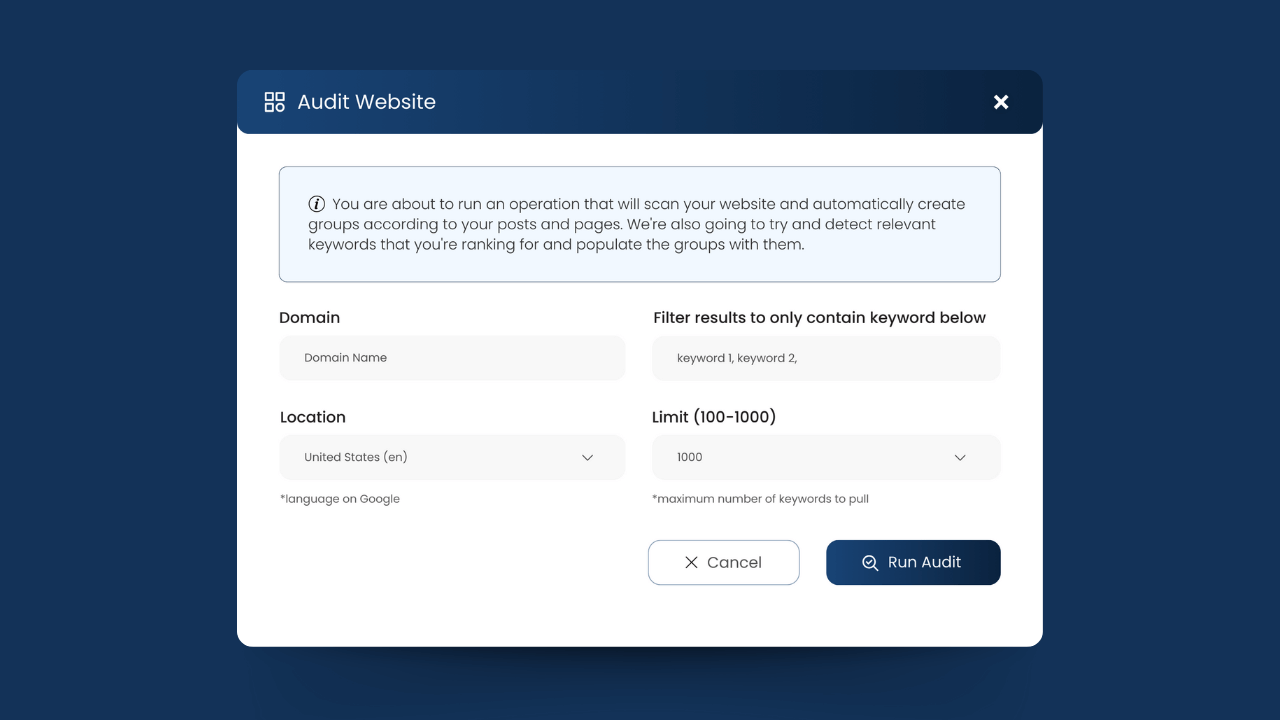
If you have a clear understanding of who your competitors are for different search terms, then I also suggest that you run a Xagio Audit on those pages. This will create another project with additional keywords for your SEO strategy.
All this will take less than 30 seconds compared to hours of manually loading keywords into spreadsheets from other SEO tools.
Balance Search Volume And Competition
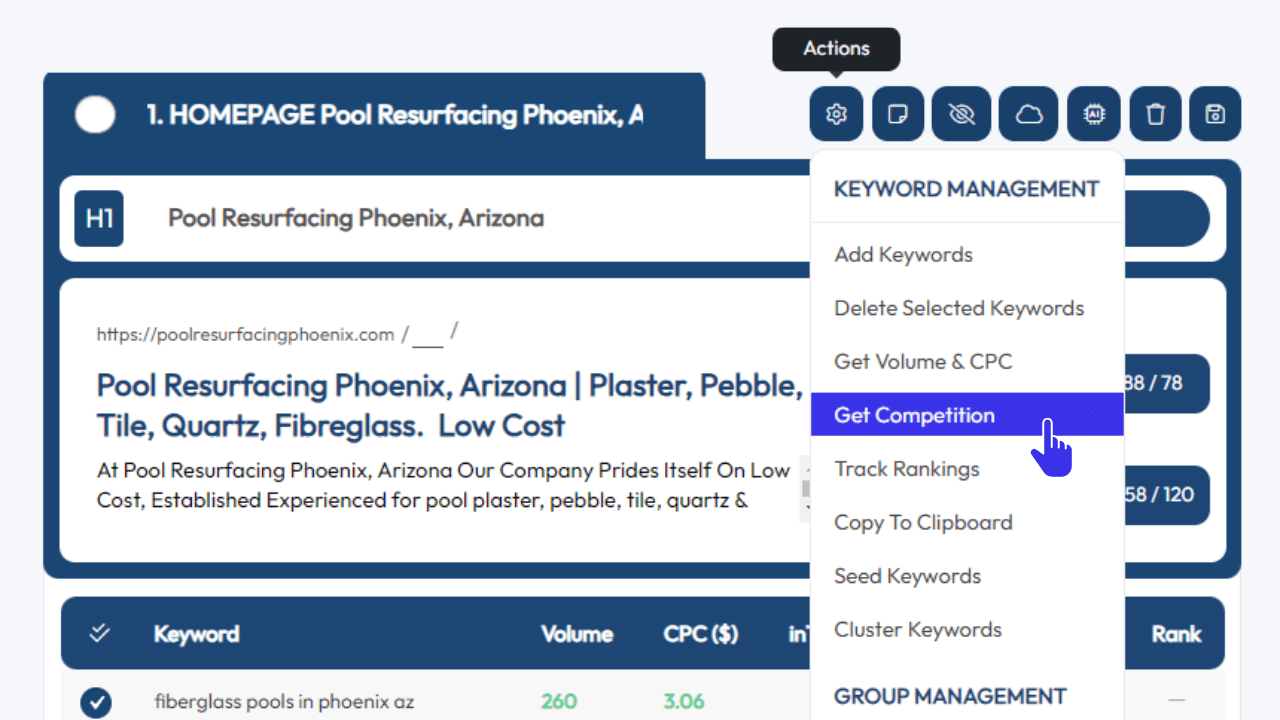
Take a look over the keyword groupings and select those that stand out as the most likely based on search volume and CPC. Then, use the “Get Competition” from the Action menu.
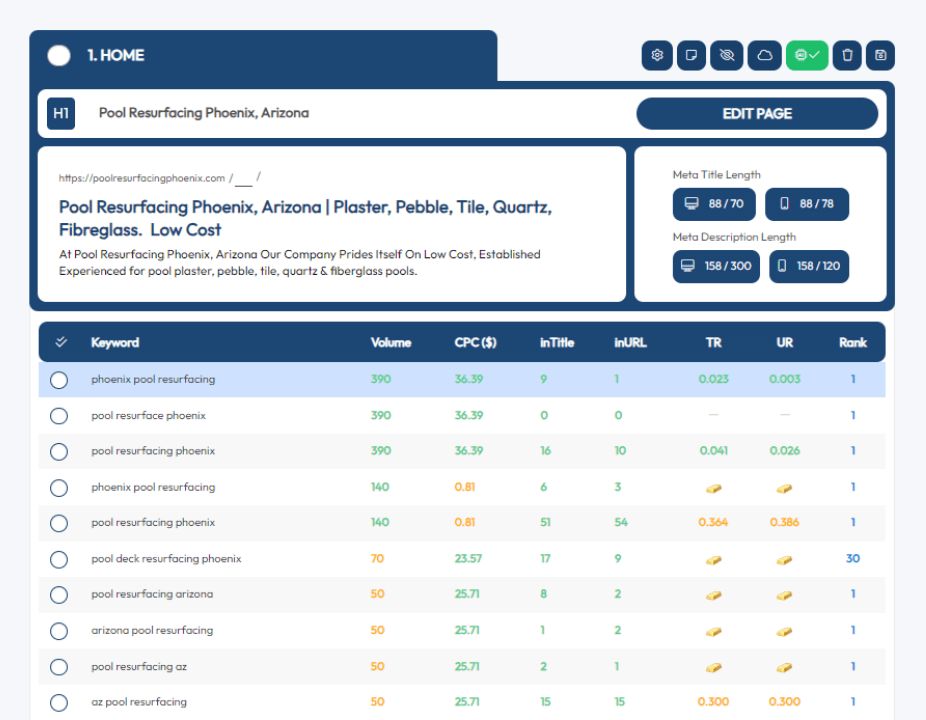
Once Xagio is done, it will highlight the keywords that have the lowest competition for you.
Xagio does a great job identifying the lowest competition from your keyword list.
The way it displays keyword difficulty is by checking the number of pages that have the keyword in the title and URL.
Xagio then calculates the ratio to the search volume, and the lower this value is, the easier it will be to rank for those keyword phrases.
You’ll notice these KWs have a small gold bar icon, making it very easy to quickly find them without having to compare the values.
Avoid Keyword Cannibalization
This is a step that most people don’t have in their keyword research processes.
When you run a Xagio Audit on a competitor’s website, you also get information about the current rankings up to position 100.
What you’ll often see is that pages rank for most of the identified keywords on pages 1 and 2.
But there will also be keywords that are on the seventh page or lower.
What does that mean?
It’s one of the most likely indicators that the page is suffering from some form of keyword cannibalization.
This is a situation where a website is targeting the same keywords on multiple pages and, as a result, search engines don’t rank any of the pages on the first page for those keywords.
If you see this during your research phase, then I suggest that you take note of those keywords and see if it makes sense to move them to a new KW group and create a separate page.
You won’t believe how often you’ll see this, and it’s an excellent way to get multiple content ideas from a single keyword.

Track Your Primary Keywords
I don’t mean track your rankings for primary keywords. That’s something you want to do once you’ve created the content and updated your website.
What I mean here is that you need to keep track of your primary focus keywords for SEO.
As your website grows and you get more content ideas, it becomes more difficult to remember what you’ve already covered.
You can track these keywords in spreadsheets, but a better option is to maintain an Audit of your site in Xagio’s Project Planner.
Either re-run the audit on a regular basis or simply add new groups to an existing master audit project as you create content for your website.
As you find new ideas, you can simply check your Audit to see if you’re already targeting the keyword on another page.
Let Xagio Streamline Your Keyword Research Process
My tried and tested process to choose keywords for SEO will help you strategically create a content plan.
The best part is that you don’t even need expensive keyword research tools to get these ideas.
Xagio has everything you need built-in and will automate the majority of the process with our proprietary AI technology.
All you need is XAGS in your account to use Audits and Wizards, and you can find out how to get more in our introduction guide.
Sign up for a Xagio account today and find out how much time and effort you’ll save for this critical stage in your content planning.