
Most SEO work is focused on climbing the rankings, but rich results can win you more clicks without moving up a single position.
They make your search listing bigger, clearer, and harder to ignore by adding details like ratings, breadcrumbs, product information, images, videos, or extra links.
But rich results do not happen by accident. You need the right structured data to help Google understand your page and decide whether it qualifies.
In this guide, we’ll explain how rich results work, which types to target, and how Xagio helps you create and test schema without editing code.
What Are Rich Results?
Rich results can appear in different forms depending on the page type and the search query. For example, a product page might show price, availability, and review ratings, whilst a recipe page might show cooking time, images, and ratings.
Blog posts, guides, and service pages can also become eligible for enhancements such as breadcrumbs, article details, video results, or FAQ-style displays where Google supports them.
Structured data helps Google understand the page and decide whether it is eligible for these features, but it does not guarantee that a rich result will appear. Google still chooses what to show based on the query, the page quality, the search layout, and its own guidelines.
Here is a good example from Apple.

And here is an example of ratings and additional clickable links.

What rich results do is help your website stand out more in search results and even take up a lot more real estate on the first page.
You may have also heard of rich snippets and schema markup, which can make things a bit confusing.
I’ll clarify those shortly.
Ultimately, with the right structured data, you can achieve a very specific, rich result that will help you attract more clicks without having to jump higher in the rankings.
Before we go into all the benefits, let’s get some terminology straight.
Jargon Buster: Rich Results Vs. Structured Data Markup Vs. Schema
Rich result terminology can get confusing because people often use terms like rich snippets, schema, structured data, and JSON-LD as if they mean the same thing.
They are connected, but each one has a different job.
Rich Results
Rich results are enhanced listings in Google that show more than the standard title, URL, and meta description.
They can include extra details such as review stars, product prices, availability, breadcrumbs, recipe information, event details, videos, or other page-specific information.
People still often call these rich snippets, but Google now uses the term rich results.
Structured Data Markup
Structured data is the machine-readable information you add to a page to help search engines understand what the page contains.
For example, if you have a product page, structured data can tell Google the product name, image, price, availability, review rating, and brand.
Structured data does not guarantee a rich result, but it can make a page eligible for one.
JSON-LD
JSON-LD is the format Google recommends for adding structured data to a page.
It sits inside a script tag in the page code and describes the content in a way search engines can read, without changing what visitors see on the page.
Other formats exist, including Microdata and RDFa, but JSON-LD is usually the easiest to manage and the safest choice for most SEO workflows.
Schema
Schema usually refers to the vocabulary from Schema.org that defines the different types of information you can describe on a page.
For example, Schema.org includes types such as Product, Article, Recipe, Event, FAQPage, LocalBusiness, Review, and BreadcrumbList.
Think of schema as the set of labels search engines understand. Structured data is the information you add using those labels.

And when you hear Google recommending something and using it in their own tools, then you better pay attention.
- In simple terms: schema gives you the labels, structured data fills in the details, JSON-LD is the format used to add them to the page, and rich results are the enhanced search listings Google may show as a result.
Common Types Of Rich Results
Different pages can qualify for different types of rich results, depending on the content, the search query, and the structured data used on the page.
Here are some of the most common rich result types worth understanding.
Review Snippets
Review snippets can show star ratings and review counts directly in search results.
They are commonly used for products, software, courses, recipes, books, and other reviewable items, but the review data must be accurate and visible on the page.
Product Results
Product rich results can show information such as price, availability, ratings, images, and delivery details.
These are especially useful for ecommerce pages because they help shoppers compare products before they click.
Breadcrumbs
Breadcrumb rich results show the page’s position within your site structure instead of displaying a long or messy URL.
They can make your listing easier to understand and help users see where the page fits within your website.
Article Results
Article structured data can help Google understand key details about a blog post, news article, or guide.
This can include the headline, author, image, published date, modified date, and publisher information.
Video Results
Video rich results can show a video thumbnail, duration, upload date, and other details in search.
If a page includes a useful video, adding video structured data can help Google understand and display that video more clearly.
Recipe Results
Recipe rich results can show images, ratings, cooking time, ingredients, and nutritional information.
These are mainly relevant for food websites, but they are a good example of how rich results can make a listing much more useful before the click.
Event Results
Event rich results can show dates, locations, ticket details, and event names.
They are useful for webinars, conferences, workshops, local events, and live sessions where searchers need practical details quickly.
FAQ-Style Results
FAQ structured data can help Google understand question-and-answer content on a page.
Google has limited how often FAQ rich results appear, so they should not be treated as guaranteed, but clear FAQ content can still improve the usefulness of a page.
Sitelinks And Search Boxes
Some enhanced results, such as sitelinks or a search box under your homepage result, are influenced more by your site structure and Google’s systems than by a single schema tag.
Good internal linking, clear navigation, strong page titles, and a logical site structure can all help Google understand which pages matter most.
Rich results are not one-size-fits-all. The right type depends on the page, the keyword, and what Google already shows for that search result.
How Do Rich Results Help Your SEO Efforts?
Rich results do not directly improve your Google rankings. Adding structured data to a page can help search engines understand your content more clearly, but it is not a ranking shortcut.
Where rich results can help is click-through rate. If your page already appears in search results, an enhanced listing can make it more visible, more useful, and more likely to attract the click.
For example, review stars can add trust, breadcrumbs can show where the page sits on your site, and product details can give searchers useful information before they visit the page. These extra details can help your result stand out against similar pages competing for the same keyword.
Rich results can be especially useful when the search results page is crowded with ads, featured snippets, image packs, videos, or competitor listings. Even if your ranking stays the same, a stronger-looking result can help you get more value from that position.
That said, structured data does not guarantee that Google will show a rich result. Your page still needs to be indexable, useful, relevant to the query, and marked up in line with Google’s structured data guidelines.
Think of rich results as a way to make good rankings work harder. They will not replace strong content or technical SEO, but they can improve how your pages appear when they already qualify for search visibility.

Planning Rich Results For Your Site
Before you add structured data to a page, it’s worth planning which rich result you actually want to target.
There are many types of structured data, but not every type makes sense for every page. Adding random schema and hoping Google rewards you is not an SEO strategy.
1. Identify The Pages Worth Optimising
Start with pages that already have a reason to appear in search.
These could be pages with existing rankings, strong impressions in Google Search Console, important commercial value, or content that answers a clear search query.
If a page gets impressions but has a low click-through rate, it may be a good candidate for rich result optimisation. The page is already being seen, so the goal is to make the search listing more useful and more clickable.
2. Check The SERP Before Choosing A Rich Result Type
Before choosing a schema type, search the target keyword and look at what Google already shows.
If the results page includes review stars, product details, videos, recipes, events, or breadcrumbs, that gives you a clue about the type of rich result Google may consider useful for that query.
This step matters because you should not choose a rich result just because you like the look of it. Google decides what fits the search intent, not your inner desire for shiny stars in every listing.
3. Match The Schema To The Page And Search Intent
Once you know what appears in the search results, match the schema type to both the page and the intent behind the keyword.
A product page might use Product schema. A blog post might use Article schema. A page with clear questions and answers may use FAQPage schema, where appropriate. A page with a video may benefit from VideoObject schema.
The key is accuracy. The structured data should describe what is genuinely on the page, not what you wish the page was about.
4. Gather The Required Structured Data
Every schema type has properties that help search engines understand the page.
Some are required, whilst others are recommended. For example, Product schema may need details like name, image, description, price, availability, and review information. Article schema may include headline, author, image, date published, date modified, and publisher details.
Gather this information before creating the markup. It is much easier than building half the schema and then realising you are missing the basics.
5. Create And Add The Markup
Once you know the right schema type and have the information ready, you can create the structured data.
Google generally recommends JSON-LD because it is easier to manage and does not interfere with the visible page content. You can create it manually, use a structured data tool, or use an SEO platform that helps generate it for you.
Whichever method you use, make sure the markup matches the visible content on the page. If the page does not show a review rating, price, FAQ, event date, or author, do not invent one in the schema.
6. Validate The Structured Data
Before publishing or updating the page, test the structured data.
Google’s Rich Results Test can show whether the page is eligible for supported rich result types. The Schema Markup Validator can help check broader Schema.org markup.
Validation is the part that stops tiny mistakes from becoming annoying mysteries later. One missing comma can turn your beautiful JSON-LD into digital soup.
7. Monitor The Results In Google Search Console
After the page has been updated, use Google Search Console to inspect the URL and check whether Google can crawl and index it.
You can also monitor enhancement reports to see whether Google has detected valid structured data. If you have made meaningful updates, request indexing after the page is live and tested.
Remember that rich results are not instant and they are not guaranteed. Google still decides whether to show them, but a properly planned and validated page gives you the best chance.
Implementing Structured Data With Xagio
Once you understand this manual process, it becomes much easier to see where Xagio can save time, reduce errors, and help you apply structured data across more pages.
1. Choose The Type Of Rich Results
Start with the pages and keywords you identified during the planning stage.
A Xagio Audit can help you find ranking pages and keyword opportunities, while Google Search Console can show where rich results are already being detected.
From there, you can focus on the pages where structured data is most likely to improve the search listing.
2. Create Your Own Structured Data In Xagio’s Cloud App
In Xagio’s Cloud App, the Schema Editor lets you create structured data without writing the JSON-LD manually.
Simply log into the Xagio Cloud App and head to the Schema section. In the Schema Editor, search for the type of schema you want to apply to the page and select the most relevant one

Once you select the type, the editor allows you to search for and choose different tags, give it a name, and save it to a specific folder.

For each of the tags you want to populate, you then have the ability to add values that are relevant to the page.
Once you’re happy, save the schema, and then you can add the structured data markup from within the WordPress editor under the Xagio plugin settings.

It’s a simple process, but I have a better and faster option for you.
3. Duplicate Competitors' Structured Data
Another useful option is to use competitor schema as a reference point.
If a competitor page is already earning a rich result for your target keyword, Xagio’s Schema Duplicator can help you analyse the schema type and properties being used.
You can then adapt that structure with accurate information from your own page, instead of starting from a blank schema template.
This is often faster than building schema manually because the SERP has already shown which type of rich result may fit the query.
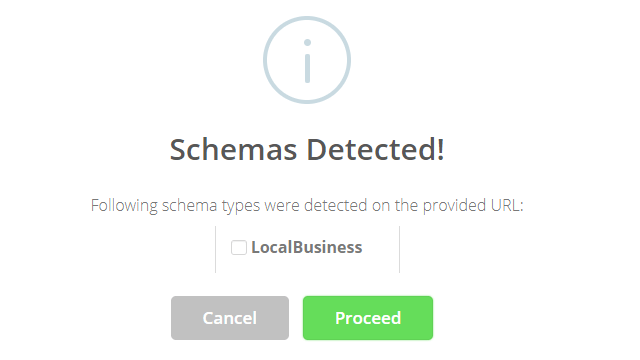
Believe me when I say this is the easiest and fastest way to get schema markup onto your site
4. Use Xagio’s AI Schema Generator
No matter which way you created the schema, it’s important to run a rich results test before you add the code to your page.
With the Xagio Schema Editor, you also have a test feature that validates the code.
This will check the code for any significant formatting errors that would make it unreadable for major search engines.
I always make this part of my last steps before I add the schema to a page.

You’ll need XAGS to run premium features like the AI Schema Generator, and you can learn more about topping up your account here.
5. Test The Schema
Xagio also includes a testing step inside the Schema Editor, so you can validate the markup before assigning it to the page.
This helps catch formatting issues or missing fields before search engines crawl the updated content.

Get The Most Out Of Search Engines With Xagio
Every SEO strategy has to account for rich snippet targeting, as it’s one of the easiest ways to boost click-through rates from search engines.
With Xagio, implementing structured data markup doesn’t have to be a technical challenge or repetitive task. We have implemented AI-powered technology that makes it easy, effective, and insanely fast.
If you don’t have a Xagio account yet, then register today and see how quickly you could be increasing traffic to your sites.