
If I could only make one change to a struggling website, I’d fix its title tags before touching anything else.
In all my years of doing SEO, no other single optimization has delivered faster or more consistent ranking jumps. I’ve watched pages move from page 9 to page 1 in Google within days, with no new content, no new backlinks, just better title tags.
Most people get them wrong, though. They either stuff them with keywords until they read like robot spam, or they write something clever that no search engine can make sense of.
In this post, I’ll show you exactly what the SEO title tag is, how it differs from the titles you see on the page, and the exact rules I follow to write title tags that rank.
By the end, you’ll be able to look at any page on your site and know within seconds whether its title tag is helping or hurting it.
Definition Of The SEO Title Tag
The SEO title tag is a piece of HTML code that is embedded in the header section of a web page.
Search engines use this information (along with other details) to determine what a web page is about, and it’s what you see on search results pages in large and bold font.
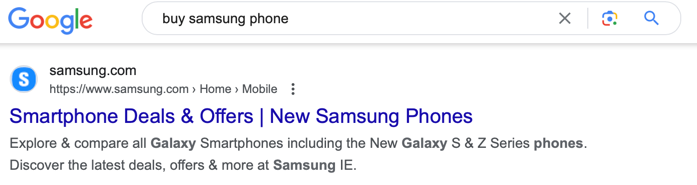
This is what the code looks like:
<title>This Is An SEO Title Example</title>
You should also not mistake the SEO title for the page title.
More on that shortly.
Together with the H1 tag and the meta description, the SEO title plays an important role when it comes to strategically placing your main target keywords.
Is The SEO Title The Same As The Page Title?
No, the SEO title and the page title are two different HTML elements. You’ll see the page title actually display when your browser loads the page, while the SEO title only shows in the embedded code and search results.
Search engines also treat these as separate ranking factors, so it’s vital that you don’t only optimize one of them and ignore the other.
You might also be tempted to simply set the SEO title and H1 tag to the exact same text. But that also is a missed opportunity when it comes to rankings, click-through rates, and time-on-page metrics.
I’ll get into more details shortly, but your aim should be to create a highly optimized and short meta title tag and a slightly longer H1 tag that captures your visitors’ interest.
That’s why I mentioned above that it takes a lot of creativity to come up with page and SEO titles.
Why Are Title Tags Important?
The title tag is important because it impacts both your rankings and click-through rates.
See, search bots that crawl your site will gather data about the title and assess how well it matches certain search terms. The better it’s optimized for a wide range of keywords you’re targeting, the higher up your site will rank.
But even when you capture one of the top positions that get a load more visitor exposure, if the SEO title they see doesn’t capture their attention within a split second, then you could end up losing a ton of traffic.
Your goal is to creatively balance technical SEO best practices with wording the title tag to instantly capture visitors’ attention.
Let’s see how you do that.

Learn How To Write SEO Title Tags?
Here’s what I do before I start writing SEO title tags.
Identify The Best Keyword To Target
You first have to be very clear about what your target keyword for a page should be. This keyword is what you then use for all on-page SEO, especially the title tag, H1, and meta description.
Choosing it well means balancing three signals: enough search volume to be worth the effort, competition weak enough that you can realistically break in, and search intent that matches what your page actually delivers.
If a keyword scores well on volume but the first page is wall-to-wall authority sites, it’s the wrong target no matter how attractive the numbers look.
We have an entire guide dedicated to choosing keywords that walks through this process step by step, so if picking the right target is something you’ve struggled with, start there.
Check For Secondary Keywords
When it comes to title tags, you have scope to add a few extra words in a creative way to target secondary keywords.
These are the closely related terms people also search, like “tree removal” alongside “tree services,” or “cost” and “near me” variations that signal buying intent.
Tools like Ahrefs and SEMrush will give you a huge dump of related keywords, and competitor research is critical for spotting which ones actually appear in the titles of ranking pages.
If you have an existing page you want to update, Google Search Console is the best free source. Check which queries the page already gets impressions for, because those are secondary keywords Google has already connected to your content.
Pick one, at most two, secondary keywords for a title tag. Any more and you’re back to keyword stuffing, which kills the readability you need for clicks.
Place The Main Keyword At The Start Of The Title Tags
Armed with your primary and secondary keywords, it’s time to start writing title tags, and the first thing you need to try is to get the primary keyword as close to the beginning as possible.
For example, if you’re targeting “Tree Services Pensacola” then your title tag might be something like “Tree Services Pensacola, FL | Expert & Affordable Care”.
There are two benefits of this.
First of all, there is evidence that the further to the beginning a target keyword appears, the higher the impact is on your search engine results.
Secondly, people searching for that keyword will notice that your HTML title tag in the search results also includes it, giving them more confidence that your page will provide what they’re looking for.
Make It Clickable And Stand Out
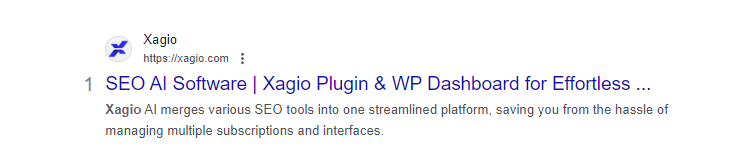
Your SEO page title tag is one of the first things that search engine users will get to see about your site.
That’s why it’s important to write title tags in a way that convinces them that you have the information they’re looking for.
I’m not referring to employing social media click-bait tactics.
But you don’t want the title tag to sound bland, boring, and unrelated to the search intent, either.
The other part of this rule is to ensure that your title tags stand out. That means you don’t want to copy exactly what competitors are doing but rather craft a unique title tag.
Do you get now why I said above that you need to be very creative?
Aim For 60 Characters
My recommendation is to keep your SEO title tag under 60 characters.
Here’s why that number matters. Google doesn’t actually count characters, it allocates a fixed pixel width of around 600 pixels in the search results, and anything beyond that gets cropped with an ellipsis.
Since letters vary in width, a title full of narrow characters might squeeze in 65 while one with lots of wide capitals gets cut at 55. Staying under 60 keeps you safely inside the limit in almost every case.
A cropped title is a wasted title. If your call to action or a key differentiator sits in the part Google cuts off, searchers never see it, and your click-through rate pays the price.
The real difficulty of this rule is creative discipline. You have 60 characters to fit your primary keyword, ideally a secondary one, and a reason to click, all while sounding like something a human would naturally say.
That constraint is exactly why title tags take more skill than almost any other piece of SEO copy on your site.
Title Tag Automation With Xagio
You can follow all the above steps and start writing title tags yourself. If you’re creative enough and like repetitive work, then those instructions will give you good results.
But, if you have the patience of a 13-year-old with WiFi speeds from the last century, then Xagio’s AI-powered automation can take care of your title tags and more in a few seconds per page.
1. Audit Your Site In Project Planner
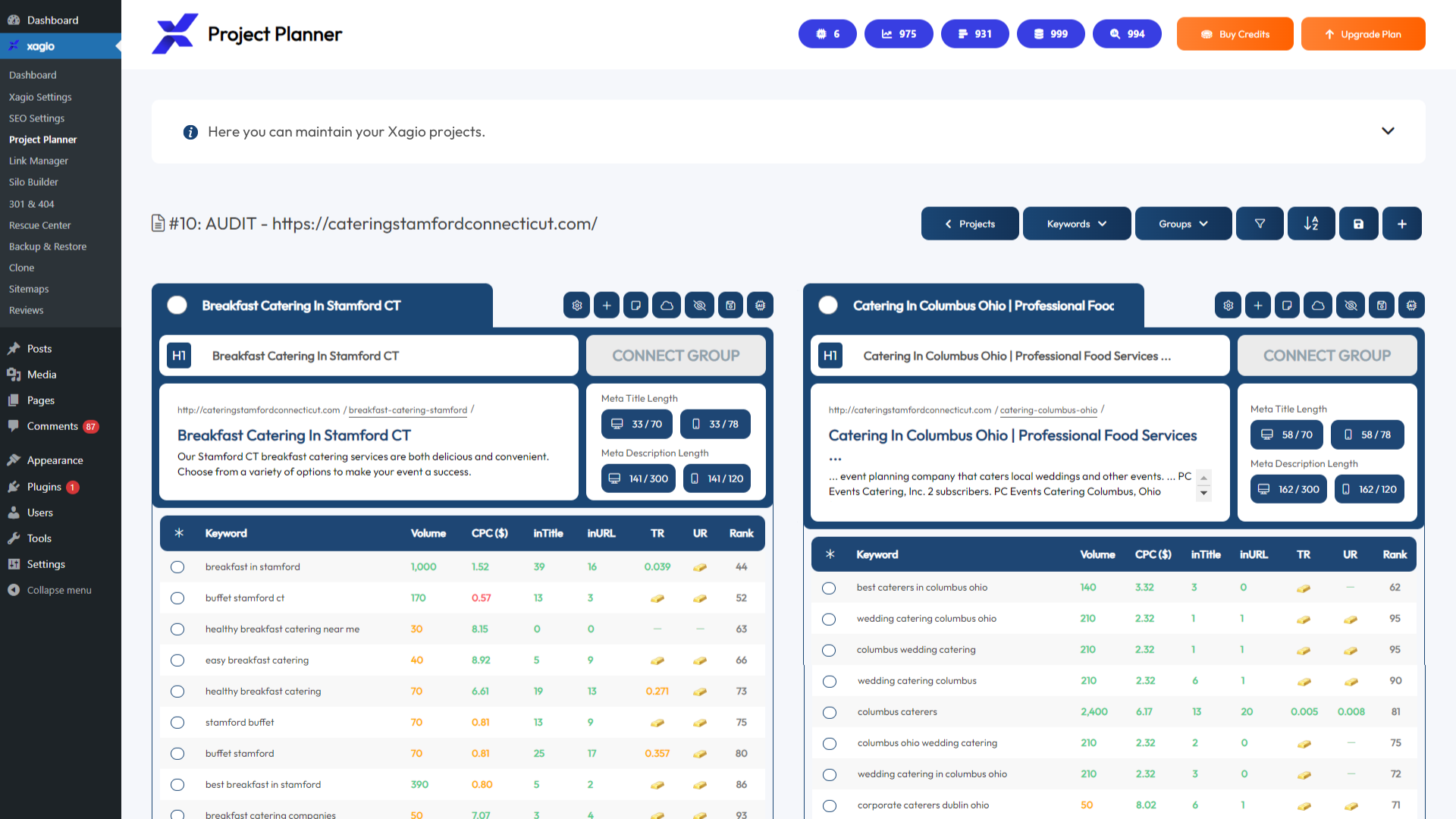
In Xagio’s Project Planner, you can launch the Audit feature and enter your website or simply click the “Import My Keywords & Rankings” button.
Within 10 seconds, you’ll have all your ranking pages and keywords listed out, and Xagio also pulls in the existing SEO title tags, H1, and meta description.
Whether you’re starting a new site from scratch or not, it’s always a good idea to audit your competitor sites to come up with keyword clusters and content ideas. Check out our guide on competitor keyword research here.
2. Load Keyword Competition Data
We have a dedicated blog post on how to find your main target keyword, but the first thing you need to do before optimizing a title tag is to gather competition data on keywords.
Xagio does this for you, and all you need to do is select the keywords you’re most interested in from a search volume perspective, and then you click on the Action menu and “Get Competition” option.
Xagio will determine the occurrence of each keyword using the search operators inTitle and inURL.
With that information, you’ll be able to decide which keyword has the best balance of search volume and low competition metrics.
Xagio even highlights the best options with a small gold bar symbol.
3. Launch AI Optimization
Once you have all the data you need to decide on what keyword will give you the best chances in search engines, you simply click on the “Optimize with AI” button.
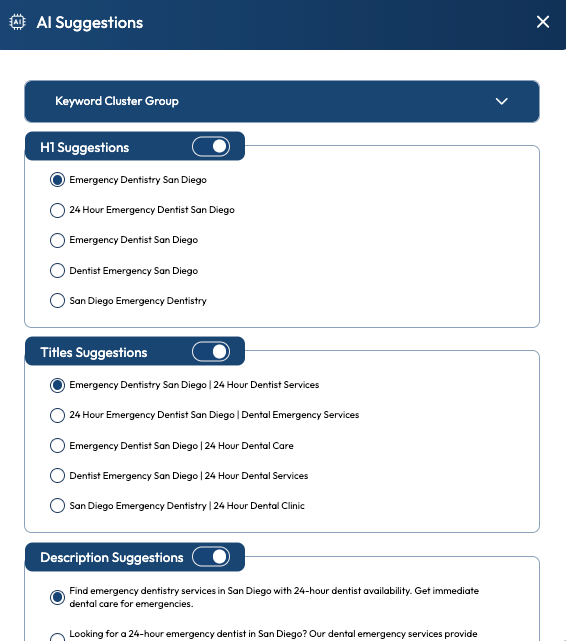
You can then either choose the keyword you want to optimize for or let Xagio AI decide for you. Our AI technology will then create five title tags, H1 tags, and meta description recommendations.
Here’s the best part through.
If you open the “Keyword Cluster Group” section at the top and select your keyword, you’ll be able to see it highlighted in all the recommendations.
That way, you can find the best-optimized title tag recommendation.
And if you want to make some changes to the H1, meta, or title tag, simply click on the text and start typing.
9 times out of 10, you’ll find compelling title tags that are ready to use.
4. Save Your Choices
Once you’re happy with your choices, you simply hit the “Use & Save to Group” button. You’ll immediately see that the title tag, H1, and meta description in Project Planner are updated.
But there’s more.
Once you save those changes, Xagio will also copy them to the actual WordPress pages. That means you don’t have to manually copy and paste them over to the page’s content editor.
It really doesn’t get any faster and more effective when it comes to automating your title tags.
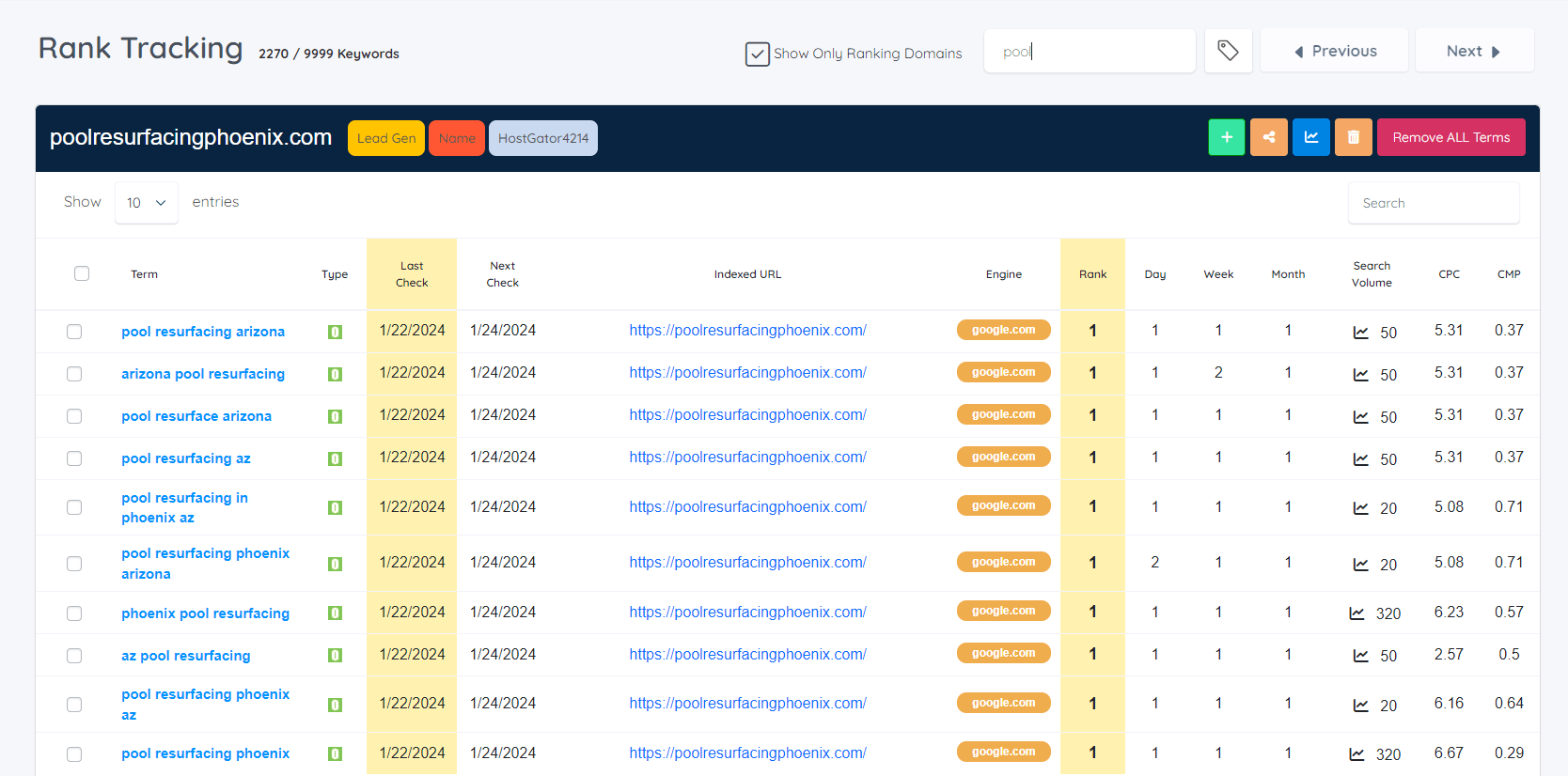
5. Track Your Progress
Updating a page’s title tag, H1, and meta description is one of the best ways to guarantee better rankings in Google’s search results.
In fact, I have tested this on hundreds of sites over the years, and it’s the one SEO tactic that I believe delivers the biggest results.
More on that shortly.
For every title tag you’ve optimized, ensure that you are tracking the rankings, and Xagio makes that extremely easy.
Simply select the keyword and then choose “Track Rankings” from the Action menu.
Wait a few days and see what happens.
I bet that within four weeks, you’ll see huge changes in rankings, all from taking care of your title tags.
The entire automated process that we’ve created can save days, and even weeks, of time and effort. But you will need XAGS in your account to use premium features like Audits, Get Competition, AI Optimization, and Rank Tracking.
XAGS are Xagio’s internal currency, which makes it as flexible as possible to use premium features, and you can find out more in our introduction blog.
Real Results From SEO Tests
When you’ve worked in SEO for long enough, you know that testing theories is one of the most important things you can do. And when I first heard about the impact of SEO titles and the 3 Kings, it sounded almost too good to be true.
Here’s the thing, though.
Whenever I take on new clients or start a new affiliate or local SEO project, the first thing I do is look at the on-page SEO title tags, URL slug, and H1 tag.
Before I add any new content, backlinks, or even internal links, I optimize all the pages using Xagio.
And the results are the same every single time.
Here is a recent example of my SEO agency in Edmonton, a city with 1 million residents.
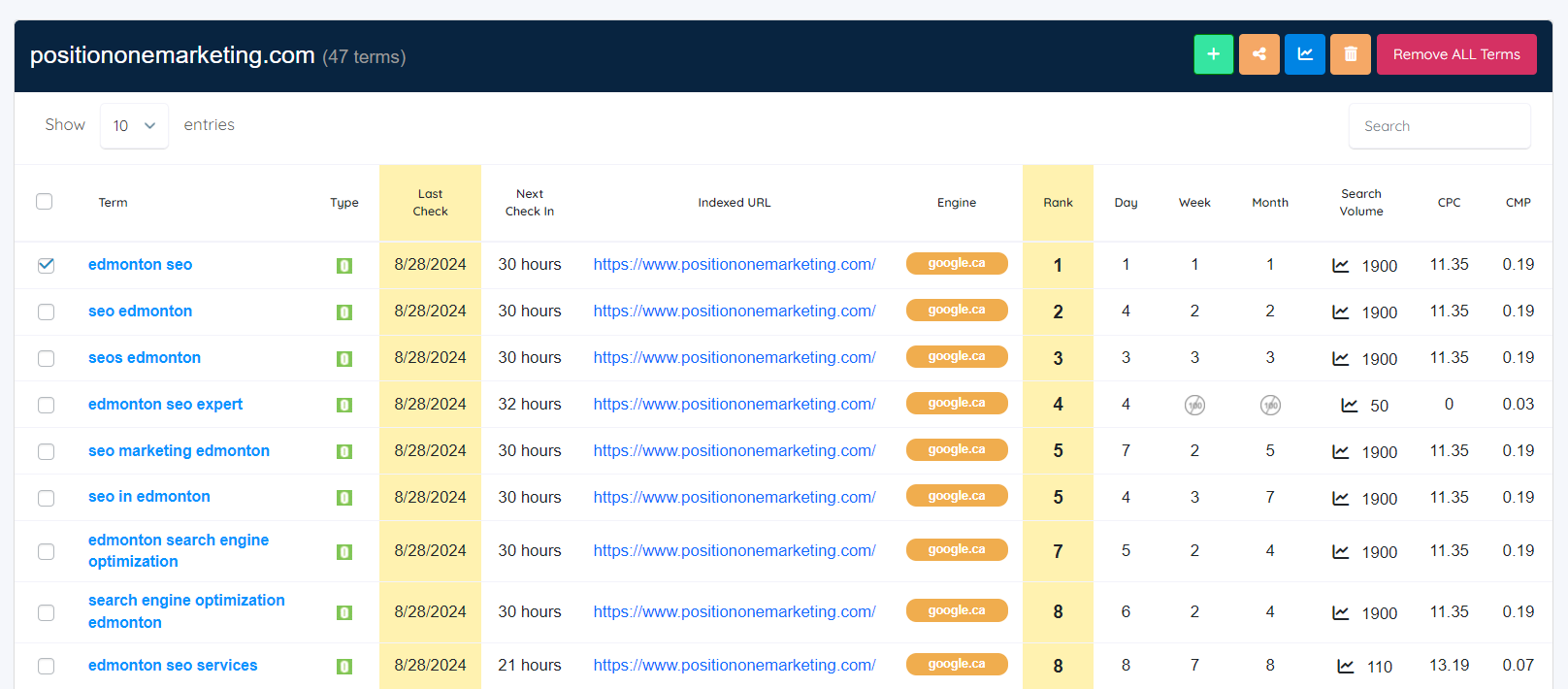
I hadn’t updated the website for a while, and when I needed a test case for the new Xagio plugin, I went ahead and used Xagio’s AI to update title tags, meta descriptions, and H1 tags.
The result was that some keywords went from page 9 in the SERPs all the way up to the first page.
Other keywords went from positions on the third page all the way to the top spot, including “SEO Edmonton.”
That’s the power of the title tag, and when you can make this optimization task so fast and easy with Xagio AI, you’ll quickly achieve massive results for your clients or affiliate websites.
Automate Title Tag Optimization With Xagio
If you don’t have the time, patience, or creative skills to write SEO titles, then Xagio AI is the most powerful tool you can invest in.
By following the above instructions, you could have an entire website optimized for the title tag, meta description, and H1 in less than 30 minutes.
And the results will become very clear within a couple of days.
Set up an account for Xagio today and see how big your return on investment will be in the first month.
And make sure you have enough XAGS in your account to save yourself a ton of time, effort, and money.